Lessn Shortlinks WordPress Plugin

I recently pur­chased the somad.es domain for use with my own URL short­ener. (Van­ity or own­ing my own URLs: you decide.) I decided to use Alan Hogan’s Lessn More, an improved fork of Shaun Inman’s Lessn. I then decided I wanted to inte­grate the short­link into my Word­Press install, but the exist­ing WP Lessn plu­gin isn’t very good. Its admin page doesn’t adhere to WP secu­rity best prac­tices, it doesn’t use WP’s HTTP API, and it doesn’t prop­erly inte­grate with WP 3.0’s short­link API. In short, it doesn’t do things the WP way.

So, I made my own lit­tle plu­gin. I didn’t want another plu­gin set­tings page, so you have to hard­code your Lessn URL and API key. It inte­grates with the “Get Short­link” but­ton on your write/edit post screen, and the rel­e­vant short­link HTTP header and meta ele­ments are auto-inserted. Only the “post” post_type will get Lessn’d by default, but see the bot­tom of the plu­gin for how to add addi­tional post_types.

<?php
/*
Plugin Name: Lessn Shortlinks
Description: Integrates WP's shortlink functionality with the <a href="http://lessnmore.net/">Lessn More</a> URL shortener. <em>Hasn't been tested with vanilla Lessn, but the API should be compatible.</em> (Edit the file manually to configure)
Version: 1.0
Author: Matt Wiebe
Author URI: http://somadesign.ca/
*/

/**
* SD_Lessn class: integrates WP's shortlink functionality with the Lessn More
* URL shortener.
*
* @uses Lessn More @link http://lessnmore.net/
* @author Matt Wiebe
* @license GPL 2
*
**/

class SD_Lessn {

const API_KEY = 'apikey'; // your Lessn API key
const LESSN_API_BASE = 'http://shorturl.com/-/'; // the API base for your Lessn install
const META_KEY = '_lessnd_url';

private $allowed_types = array('post');

function __construct() {
add_action('publish_post', array($this, 'get_lessnd_url'), 10, 1 );
add_filter('get_shortlink', array($this, 'get_shortlink'), 10, 3 );
}

public function add_post_type( $post_type = '' ) {
if ( $post_type )
$this->allowed_types = array_merge( $this->allowed_types, (array) $post_type );
}

public function get_lessnd_url( $post_id ) {
if ( 'publish' !== get_post_status($post_id) )
return false;

if ( ! in_array( get_post_type($post_id), $this->allowed_types ) )
return false;

if ( $url = get_post_meta( $post_id, self::META_KEY, true) )
return $url;

$params = array(
'api' => self::API_KEY,
'url' => get_permalink($post_id)
);
$api_url = add_query_arg($params, self::LESSN_API_BASE);

$get = wp_remote_get($api_url);

if ( is_wp_error($get) )
return false;

$lessnd_url = wp_remote_retrieve_body($get);

if ( $lessnd_url ) {
update_post_meta( $post_id, self::META_KEY, $lessnd_url );
return $lessnd_url;
}
return false;
}

/**
* @param int $id A post or blog id. Default is 0, which means the current post or blog.
* @param string $contex Whether the id is a 'blog' id, 'post' id, or 'media' id. If 'post', the post_type of the post is consulted. If 'query', the current query is consulted to determine the id and context. Default is 'post'.
*/

public function get_shortlink( $shortlink, $id, $context ) {

if ( 'query' == $context ) {
global $wp_query;
if ( is_singular() ) {
$context = 'post';
$id = $wp_query->get_queried_object_id();
}
}

if ( 'post' !== $context )
return $shortlink;

// Try Lessn'd url.
if ( $try_lessn = $this->get_lessnd_url($id) )
return $try_lessn;
// do_action('elog', $shortlink);
return $shortlink;
}
}

$sd_lessn = new SD_Lessn;

// uncomment line below to add support for the "page" post_type
// $sd_lessn->add_post_type('page');
view raw sd_lessn.php This Gist brought to you by GitHub.

Now, I just need to fig­ure out how to inte­grate short­links for humans rather than just machines.
FontFriend 2.5

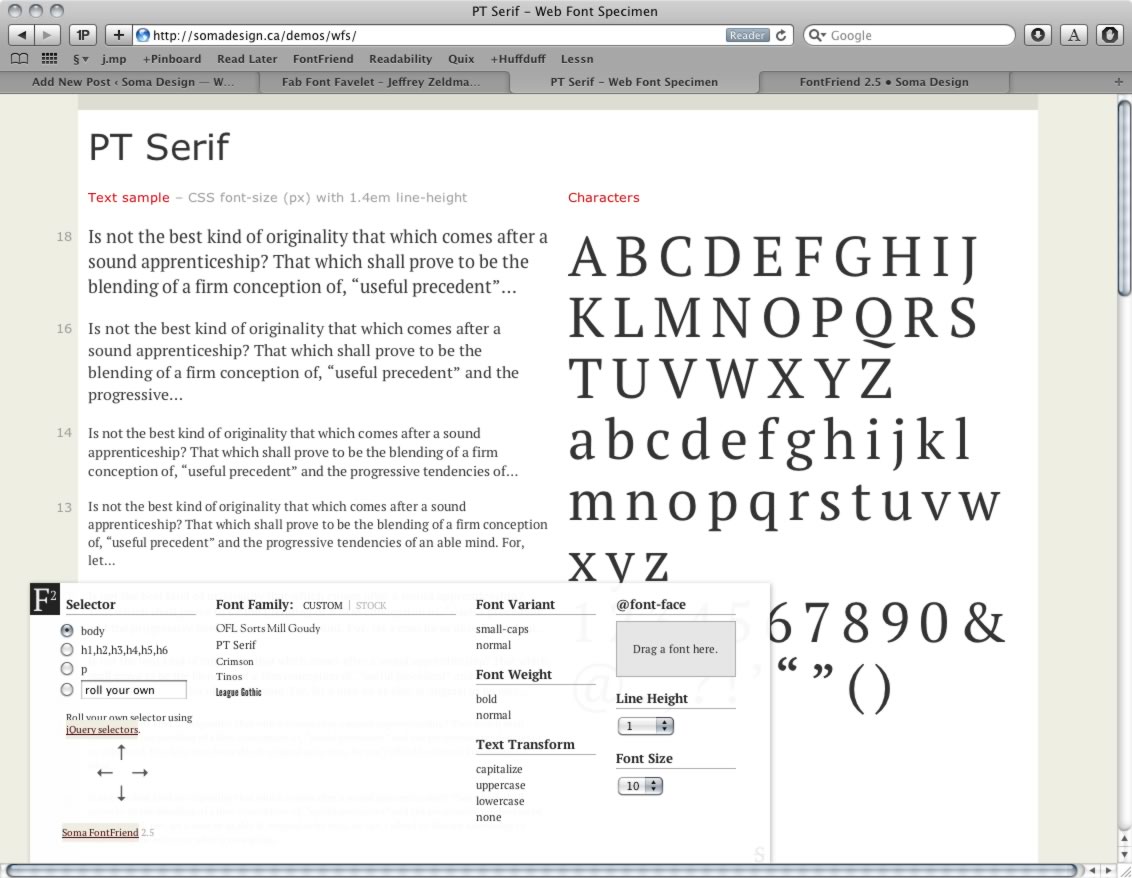
Font­Friend was designed and coded as dur­ing the twi­light of the pre-webfont era. In fact, it was abstracted out of some code I’d been using while devel­op­ing the CSS font stacks for my Word­Press theme The Eru­dite. I haven’t been using it much as of late, as I’ve been wear­ing my devel­oper hat more than my designer one of late.

But, as I’ve been tin­ker­ing with pos­si­ble redesigns of my per­sonal site, I’ve been play­ing around with web­fonts a lot, a work­flow that never crossed my mind when design­ing it. So, rather than putting my design energy to work on my site design, I decided to extend Font­Friend to sup­port cus­tom Font Fam­ily lists.

FontFriend’s new cus­tom font fam­ily list

This is a fea­ture for front-end designers/developers, so there is no user-facing UI for this fea­ture. Instead, on a site that you want to test web­fonts on, you can pro­vide that Font­Friend will rec­og­nize in one of 2 ways:

1. A data– attribute on the body element

<body data-ff-families="OFL Sorts Mill Goudy,PT Serif,Crimson,Tinos,League Gothic">

2. A JavaScript array

The nice part about the JS method is that you can use your JS con­sole to set the var before invok­ing FontFriend.

<script>
  var fontFriendFamilies = ["OFL Sorts Mill Goudy", "PT Serif", "Crimson", "Tinos", "League Gothic"];
</script>

That’s it! Use whichever nota­tion suits your work­flow. See it in action right now by vis­it­ing the updated Soma Web Font Spec­i­men and invok­ing the book­marklet (you’ve already installed it, right?).

Doing Things the WordPress Way

This past Fri­day marked the sec­ond Win­nipeg Word­Press meetup, and it was fan­tas­tic. It also marked my first time pre­sent­ing on a tech topic, and I thank every­one for let­ting me ram­ble for a while! Len from WPCanada has a great writeup of the event and has high hopes for the future.

My pre­sen­ta­tion was on Doing Things the Word­Press Way, which cov­ered a few things I’ve picked up along the way as a WP devel­oper. A few peo­ple asked for the slides, so here they are:

Doing Things the Word­Press Way (on Slideshare)

Big thanks to Ian Stew­art for orga­niz­ing the event, and to the Digi­he­dron crew for host­ing us. Sub­scribe to the Win­nipeg Word­Press meetup blog for updates about future events.

Better Web Reading

It’s damn hard to read web con­tent some­times. Too-small text, arti­cles split over mul­ti­ple pages, gra­tu­itous ban­ner ads, design that steals you atten­tion from the actual con­tent: these all con­spire to make read­ing on the web—especially long-form content—frustrating, painful and some­times down­right infu­ri­at­ing. 2010 saw two major approaches to this come to some degree of promi­nence, and both have made me so much happier.

Read­abil­ity

The first approach makes in-browser read­ing bet­ter through the Read­abil­ity book­marklet. It strips away every­thing except the text you’d like to read, sized and for­mat­ted appro­pri­ately for on-screen read­ing. Safari incor­po­rated Read­abil­ity tech­nol­ogy in its Reader func­tion­al­ity in Safari 5, bring­ing bet­ter read­ing to folks who have no idea what a book­marklet is. What I espe­cially love about Safari Reader is that it does a good job of string­ing a multi-page arti­cle into a sin­gle page.

Read it Later

The sec­ond approach is using a third party ser­vice like Instapa­per (which I use and love) or Read it Later to extract the main con­tent from a web page and read it later on a vari­ety of a devices. Both have iOS apps that sync with the ser­vice to give you the con­tent you’d like to read, even offline. This is a vast improve­ment over the old “I’ll leave this tab open and come back to it later” approach that rarely, if ever, worked in practice.

Both of these trends in web reading—especially the first—demonstrate that peo­ple are no longer putting up with design that dis­re­spects con­tent. They want design that puts con­tent first, like The Eru­dite, which has been down­loaded 92,832 times as of this writ­ing. Hope­fully we’ll see less need for Read­abil­ity as web design­ers start mak­ing actu­ally read­able sites.

Testing IE9’s WOFF Support

IE9 offi­cially sup­ports the new WOFF for­mat for embed­ding web­fonts. And there was much rejoic­ing. But, the ques­tion that’s been nag­ging away at me has been: how do we as web devel­op­ers account for IE’s legacy EOT for­mat while giv­ing pref­er­en­tial treat­ment to the emerg­ing WOFF standard?

The short answer is: keep using Paul Irish’s bul­let­proof smi­ley syn­tax. WOFF will be loaded by browsers that under­stand it, and legacy IE ver­sions (8 and under) will load EOT.

The long answer: every src dec­la­ra­tion within the @font-face block effec­tively resets the CSS parser’s attempt to find the appro­pri­ate font file. The ren­der­ing engine will use the first viable font source in the last src dec­la­ra­tion inside each @font-face block. Paul Irish’s smi­ley syn­tax works per­fectly here, since the first src dec­la­ra­tion is only under­stood by IE < 9 (due to the EOT for­mat), while the sec­ond src dec­la­ra­tion is under­stood by >= IE9 and all other good browsers.

This pro­duces a win-win sit­u­a­tion. Good browsers that aren’t IE ignore the first src dec­la­ra­tion because EOT is not viable to them. IE9 prefers the sec­ond src dec­la­ra­tion because it under­stands EOT.

I have a few test cases to view. They’re also avail­able on Github.