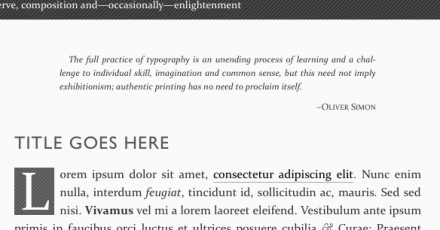
The Erudite 2.5 has been released, with a couple of really nice new features. I had a request to include epigraphs in the theme, which perfectly matches The Erudite’s emphasis on typography and content. Have a look at the image or check the demo site:
I also learned this month from WP core team member Andrew Ozz that it’s possible to style the visual editor. Now you’ll have a much better idea of how your prose will look before you press Publish:
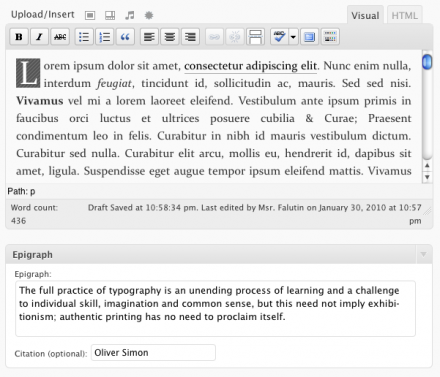
You’ll also note above how easy it is to add an epigraph to your posts.
Finally, thanks to Dennis Meulensteen for providing a Dutch translation. If you have a translation you’d like to contribute back to The Erudite, let me know in the comments or get in touch.
To download, go to the WP Themes Directory or, if 2.5 isn’t available there yet, to the project page.
12 Comments
Wonderful, even if the styled visual editor does’n really work well in Safari. Is it possible to disable it?
@Maurizio Comment out line 17 in functions.php to disable the visual editor styles. Or just use the HTML editor.
Hi,
Downloaded the theme from WordPress and its great, really good ideology behind it. Even better, it was free but it did the job and got me to come to your site.
I don’t think its particularly suited to my type of business but i don’t care and i’m gonna use it anyway.
I wanted more control of the fonts and positioning though (para indents) and wondered who i can access the CSS file.
Thanks and great work,
Runako
Hi Matt,
If I may ask, how I can add epigraph on the theme? I mean do I need to hack the template? Since I don’t see any function on the dashboard (or I missed something?).
Thanks and regards,
Cahya.
@Cahya Epigraphs are attached to posts, not the theme. You add one on the New Post screen.
Thanks Matt, I’ve always XML-RPC posting so I missed that part. Sorry.
I just try the new release…, since I still learn about so style coding, I want to take a note of CSS sampel on the blog and wrap it using
<pre><code>sampel code</code></pre>, but it seemed the code got messed and not wrapped at all.I don’t know, on the preview using WLW they should be got wrapped, but after published, they no longer wrapped.
@Cahya Code inside a <pre> element will not wrap. <pre> preserves whitespace and will not wrap until you enter an explicit return in the text inside. You can override this behaviour with the
white-space:pre-wrap;CSS declaration, but not all browsers support it.Okay,
I think I shall try with wp-typography with cautions 🙂
Btw, I would like to help for a translation into Indonesian Language. I knew how to translate a .po file (with poedit), but I never works with .pot file.
Can you send me a .po file to translate, or anything else I could do for the translation?
Regards,
Cahya.
@Cahya all you need to do is copy the-erudite.pot to yourlang.po and go from there. There should be a readme file in the translations folder that explains this and more.
Hi Matt,
Thanks a lot, now I finished my transalation for “The Erudite” lang file into Bahasa Indonesia (Indonesia language).
You can check about it here: http://catatan.legawa.com/2010/05/indonesian-translation-for-the-erudite/
Thanks for providing us a nice theme 🙂
Regards,
Cahya.
Hello!
Your theme is fantastic. After searching through hundreds of options I fell in love with it, great job!
I was wondering if you wouldn’t mind sharing which typefaces you use, exactly.
Cheers,
Kelsey
@Kelsey Just search through erudite.css and look for “font-family”.
One Trackback